A lean, fast RTTY terminal and QSO log for TCI radios — SunSDR with ExpertSDR and compatibles. Audio, frequency, PTT, filters and AGC over a single TCI link: no virtual cables, no CAT, no COM ports.
Un terminale RTTY snello e veloce, con log QSO, per radio TCI — SunSDR con ExpertSDR e compatibili. Audio, frequenza, PTT, filtri e AGC su un'unica connessione TCI: niente cavi virtuali, niente CAT, niente porte COM.
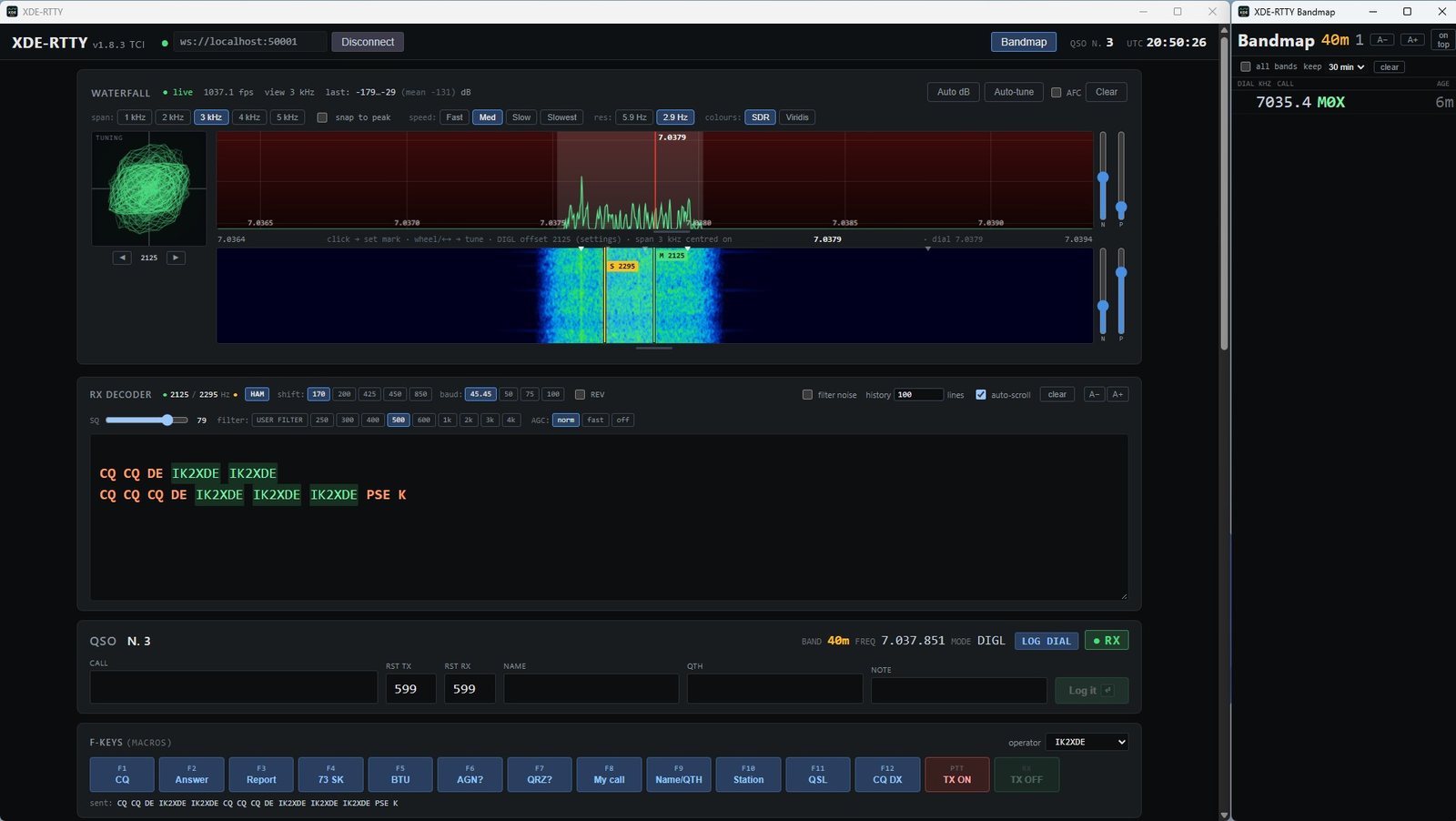
Designed for everyday RTTY traffic and DX, with the feel of the radio's own panorama.
Pensato per il traffico RTTY di tutti i giorni e per il DX, con l'aspetto del panorama della radio.
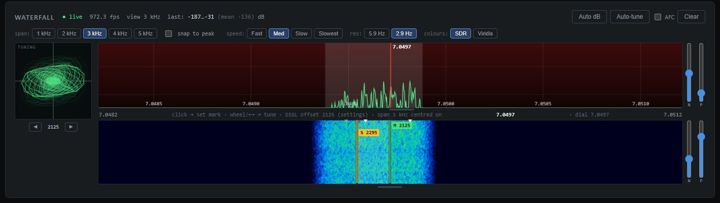
Centred on the dial, frequencies left to right like the radio, resolution down to 2.9 Hz, SDR colours, adjustable levels, movable divider and resizable panel.
Centrati sul dial, frequenze da sinistra a destra come sulla radio, risoluzione fino a 2,9 Hz, colori SDR, livelli regolabili, divisorio mobile e riquadro ridimensionabile.
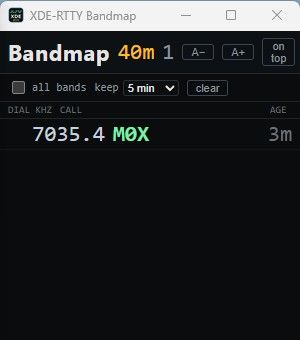
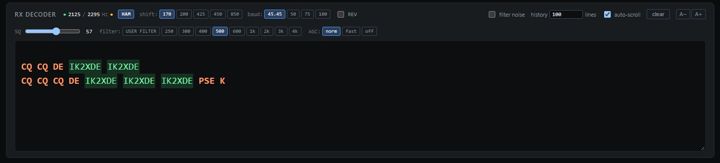
Callsigns copied anywhere in the passband appear on the waterfall and in a separate skimmer-style bandmap. One click loads the call and tunes the radio.
I nominativi decodificati in tutta la banda passante compaiono sul waterfall e in una bandmap separata, stile skimmer. Un clic carica il nominativo e sintonizza la radio.
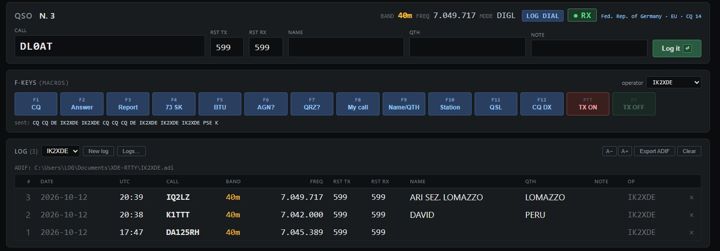
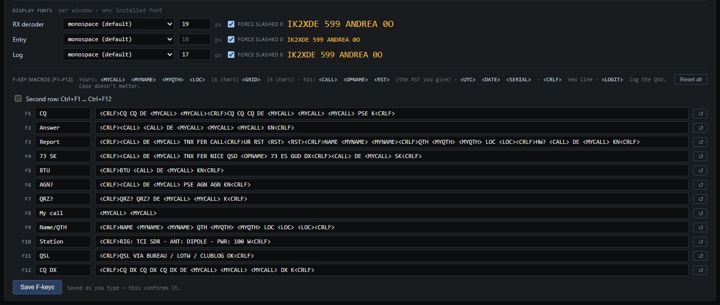
12 macros (plus Ctrl+F1…F12) with tokens like <CALL> and <LOGIT>; live keyboard sending by word, character or line.
12 macro (più Ctrl+F1…F12) con segnaposto come <CALL> e <LOGIT>; trasmissione dal vivo da tastiera per parola, carattere o riga.
Multiple logs and operators, name/QTH recall, worked-before flags, country lookup (BIG CTY), automatic ADIF file, ADIF import/export.
Più log e più operatori, richiamo di nome e QTH, segnalazione dei già collegati, paese (BIG CTY), file ADIF automatico, import/export ADIF.
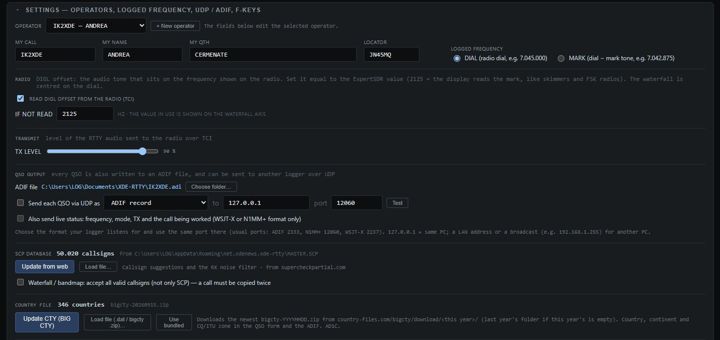
Each QSO sent as ADIF, N1MM+ contactinfo or WSJT-X Logged ADIF — with live status (frequency, mode and the call being worked).
Ogni QSO inviato come ADIF, N1MM+ contactinfo o WSJT-X Logged ADIF — con lo stato in tempo reale (frequenza, modo e nominativo in lavorazione).
RX filters 250 Hz – 4 kHz centred on the station, AGC, DIGL mode, TX level, DIAL/MARK logged frequency matching FSK and RBN spots.
Filtri RX da 250 Hz a 4 kHz centrati sulla stazione, AGC, modo DIGL, livello TX, frequenza a log DIAL/MARK allineata a FSK e spot RBN.
Click an image to enlarge it.Fai clic su un'immagine per ingrandirla.


Version 1.8.3 · free of charge for radio amateurs · total downloads: 2
Versione 1.8.3 · gratuita per i radioamatori · download totali: 2
| OS | Windows 10 / 11 (64 / 32 bit) | |
| Radio | TCI server: SunSDR + ExpertSDR2/3 or compatible (TCI 1.9 / 2.0) | Server TCI: SunSDR + ExpertSDR2/3 o compatibili (TCI 1.9 / 2.0) |
| Runtime | Microsoft WebView2 (included in Windows 10/11) | Microsoft WebView2 (incluso in Windows 10/11) |
| Internet | Optional: country file and SCP updates | Facoltativo: aggiornamento file paesi e SCP |
Full details in the user manual.
Tutti i dettagli nel manuale d'uso.
In ExpertSDR enable the TCI server and note its port (e.g. 40001 or 50001).
In ExpertSDR attiva il server TCI e annota la porta (per esempio 40001 o 50001).
Set the DIGL offset to 2125 in ExpertSDR and in XDE-RTTY: the display then reads the mark frequency, like FSK and RBN spots.
Imposta l'offset DIGL a 2125 in ExpertSDR e in XDE-RTTY: il display indica la frequenza del mark, come in FSK e negli spot RBN.
Type ws://localhost:<port> and press Connect. Fill in your call, name, QTH and locator in Settings.
Scrivi ws://localhost:<porta> e premi Connect. In Settings inserisci nominativo, nome, QTH e locatore.
Press HAM, click a station on the waterfall, use F1–F12, log with Enter. Esc stops any transmission.
Premi HAM, fai clic su una stazione nel waterfall, usa F1–F12, registra con Invio. Esc ferma qualsiasi trasmissione.
Main changes only.Solo le modifiche principali.
| 1.8.3 | Side level controls (N/P) for spectrum and waterfall; resizable spectrum + waterfall panel. | Regolatori laterali (N/P) per spettro e cascata; riquadro spettro + cascata ridimensionabile. |
| 1.8 | Spectrum above the waterfall, SDR colours, resolution up to 2.9 Hz, movable divider; TX ON opens the KEY window; UDP live status (WSJT-X / N1MM+). | Spettro sopra la cascata, colori SDR, risoluzione fino a 2,9 Hz, divisorio mobile; TX ON apre la finestra KEY; stato UDP in tempo reale (WSJT-X / N1MM+). |
| 1.7 | DIGL offset support; waterfall centred on the dial, frequencies increasing left to right. | Gestione dell'offset DIGL; waterfall centrato sul dial, frequenze crescenti da sinistra a destra. |
| 1.6 | New layout and colours; tuning scope beside the waterfall; RX filters 250 Hz – 4 kHz. | Nuova grafica e colori; scope di sintonia accanto al waterfall; filtri RX da 250 Hz a 4 kHz. |
| 1.4 | RX filter and AGC from the program; adjustable TX level; second F-key row; font size buttons. | Filtro RX e AGC dal programma; livello TX regolabile; seconda fila di F-key; dimensione del testo. |
| 1.3 | Separate bandmap (skimmer) window; accept all valid callsigns. | Finestra bandmap (skimmer) separata; accettazione di tutti i nominativi validi. |
| 1.1 – 1.2 | Multiple operators; BIG CTY download; automatic ADIF file; UDP output (ADIF, N1MM+, WSJT-X). | Più operatori; scaricamento BIG CTY; file ADIF automatico; invio UDP (ADIF, N1MM+, WSJT-X). |
| 1.0 | First release: RTTY terminal for TCI radios with general QSO log. | Prima versione: terminale RTTY per radio TCI con log QSO generale. |
XDE-RTTY is freeware for ham radio use: free of charge for radio amateurs, and you are welcome to share it. It is provided "as is", without warranty. XDE-RTTY includes open-source code released under the MIT licence; the licence notice is installed with the program and printed in the manual.
XDE-RTTY è freeware for ham radio use: gratuito per i radioamatori, che possono condividerlo liberamente. È fornito "così com'è", senza garanzie. XDE-RTTY include codice open source rilasciato con licenza MIT; il testo della licenza è installato con il programma e riportato nel manuale.
 XDE-RTTY